Turned a content creator's manual posting grind into a tool that runs entirely on her laptop
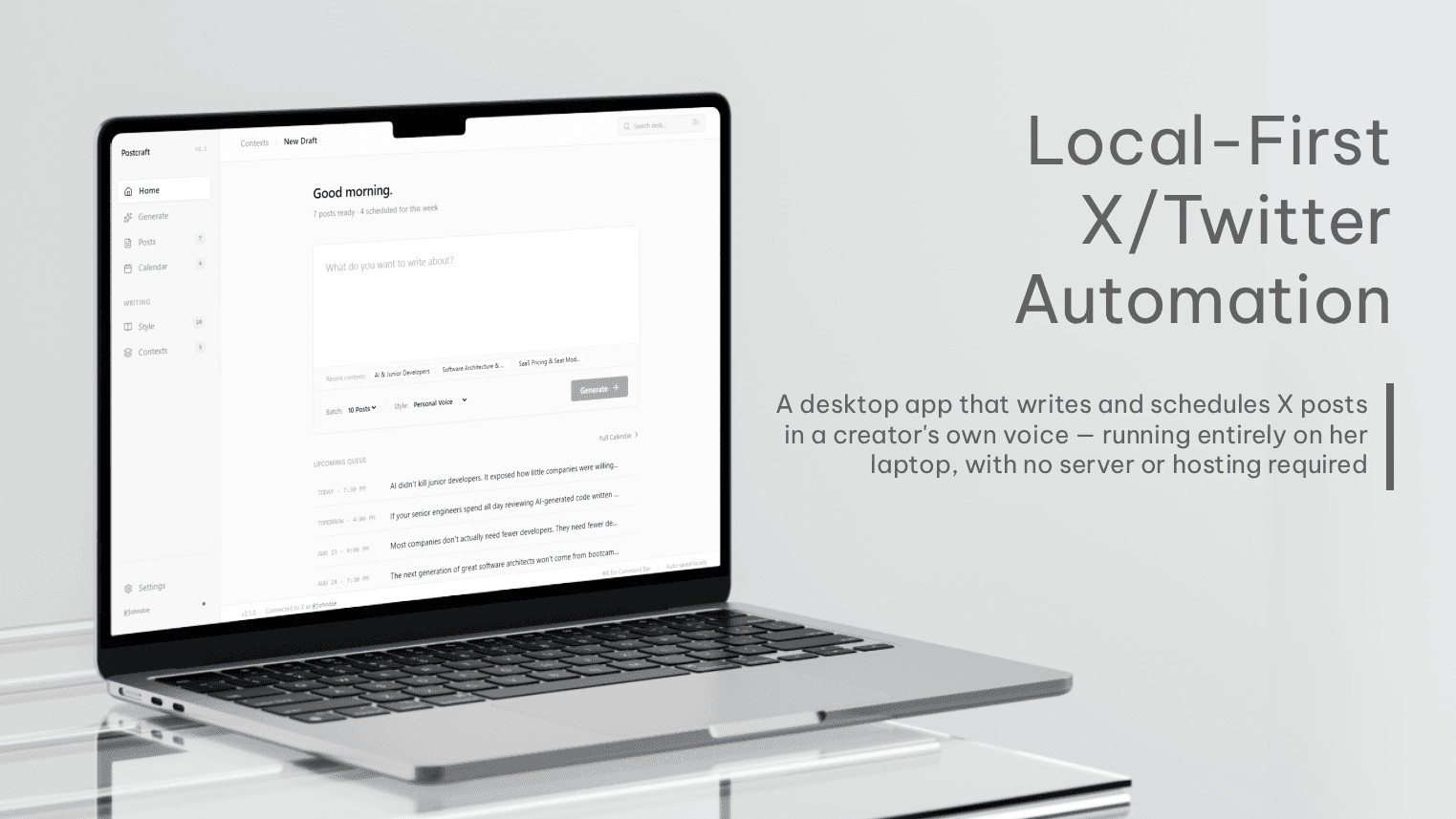
How we built a Twitter/X automation tool for a solo content creator — one that runs entirely on her own machine, with no server, no hosting bill, and nothing to maintain but the app itself.
- Client
- Taras P.
- Industry
- Content Creation / Social Media
- Engagement
- Custom Software
- Duration
- 2 weeks
Key Results
- •Zero Hosting Costs: Runs entirely on the user's own machine — no server, cloud database, or hosting bill for a tool built for exactly one person
- •Distinct Angles, Not Duplicate Posts: Every batch starts by generating distinct angles on a topic before writing posts, instead of ten variations of the same tweet
- •Sounds Like Her, Not Generic AI: A persistent style profile combined with real examples of her own writing shapes every generated post
- •No Duplicate Publishing: Posts go out through the official X API with idempotent handling, so a network retry can't post the same thing twice
- •Cross-Platform From One Codebase: Ships as a native application on both Windows and macOS
- •Manual Writing Replaced With Review-and-Schedule: The daily writing-from-scratch routine is now reviewing and editing AI-drafted batches
The Client is a content creator who posts regularly on X — and for a long time, that meant writing every post herself, day after day, then manually scheduling or posting it in the moment.
She wanted to automate that loop: generate posts from ideas she already had in mind, review and edit them, and get them scheduled without starting from a blank page every single day. But she was explicit about one thing going in: she didn't want something complicated to run.
That one requirement ended up shaping almost every decision in the project — including a few we had to walk back after getting them wrong the first time.
Why the obvious automation tools didn't fit
The first instinct for a project like this is usually a workflow-automation platform — something like n8n, chained together with a scheduling trigger and an LLM node. It's fast to set up and doesn't require writing much code.
For her, it was the wrong shape. A chain of automation nodes is still something she'd eventually have to open, understand, and debug herself when something needed adjusting. "Simple" to her didn't mean "quick to set up" — it meant something she could actually use without becoming its maintainer. That ruled out no-code automation from the start.
The first architecture we designed was also wrong — just less obviously
Once we committed to building something custom, the natural next step was the shape almost every web product takes: a frontend talking to a hosted backend, with a database and a background worker behind it. We drew up exactly that — a generation service, a Postgres database, Redis for queuing, the whole familiar stack.
It was a reasonable design. It also would have been a mistake.
This isn't a product with many customers. It has exactly one: the person using it. There's no second account to isolate, no concurrent traffic to plan capacity for, no reason a server needs to stay running at 3am independent of whether she's actually using the app. A hosted backend here would have meant a real, recurring cost — server hosting, a managed database, deployment infrastructure — to serve a single person who already owns a perfectly capable machine to run all of it on. The server costs alone made no sense for something built for one user.
Once we asked who was actually going to use this, the architecture had an obvious answer: nobody needed a server at all.
Building something that lives entirely on her machine
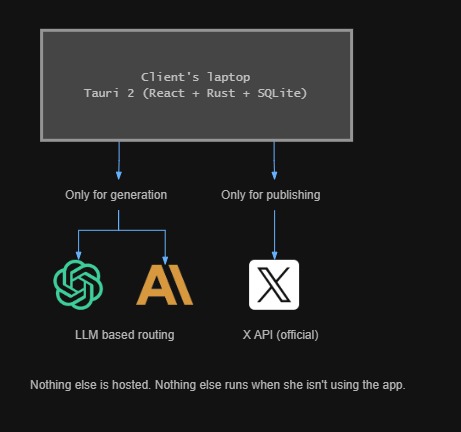
We rebuilt the plan around a native desktop application instead of a hosted web app: Tauri 2 as the application shell, a React and TypeScript interface, and a Rust backend running locally alongside it. The data — her writing style, her drafts, her scheduled posts — lives in a SQLite database on her own machine, not in a cloud database she'd never see.
The application only reaches out to the internet for the two things that actually require it: calling the LLM to generate posts, and calling X's official API to publish them. Everything else — the interface, the database, the scheduler — runs locally, with nothing hosted and nothing to keep paying for.
Her X and LLM credentials don't sit in a database file, either. They're stored through the operating system's own secure credential storage — Windows Credential Manager on Windows, Keychain on macOS — the same place a browser would store a saved password, not a plaintext row in SQLite.
And because there's no cloud copy of any of this, the application includes a straightforward export/backup path, so losing a laptop doesn't mean losing months of writing history.
Making the writing sound like her, not a generic AI
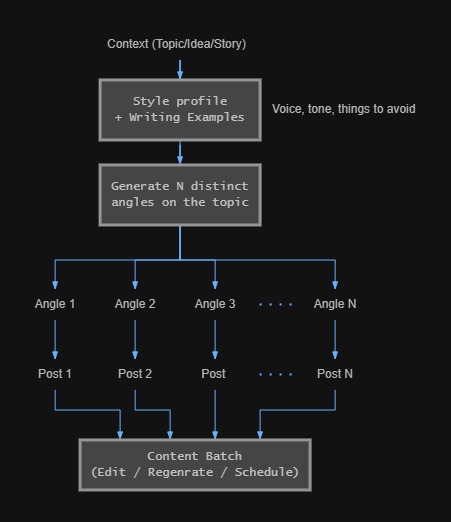
The generation system is built around two things that persist across every session: a style profile — voice, tone, sentence structure, things to avoid — and a growing set of her own actual posts as examples. Every generation call includes both, so the output is shaped by how she actually writes, not a generic "write like a content creator" prompt.
Asking an LLM directly for "10 posts about this topic" tends to produce ten versions of the same thought. So generation happens in two steps: the system first produces several distinct angles on the topic, and only then writes a post from each one. That's what actually gives her a batch worth choosing from, instead of a batch worth skimming past.
Nothing gets posted twice
Publishing goes through X's official API only — never browser automation pretending to be a person clicking "post." Every publish attempt is idempotent, so if a request times out and the client retries, the system won't accidentally post the same thing twice. Failed publishes are recorded with the reason and retried on a defined path instead of silently disappearing.
It's a small piece of the system. It's also the one place a bug would be visible to her followers, not just to her — which is exactly why it got treated as a reliability problem, not just a feature to ship.
Where It Stands Now
The daily grind of writing and posting by hand is gone. She now works from batches of AI-drafted posts — written in her own voice, grounded in her own examples — that she reviews, edits where she wants, and schedules, instead of starting from nothing each morning.
The application runs entirely on her own machine. There's no server to keep online, no hosting bill arriving every month, and no infrastructure to maintain beyond the app itself — which was the entire point.
The Stack
Desktop Framework
Tauri 2
Frontend
React • TypeScript • Tailwind CSS • shadcn/ui • Zustand
Backend
Rust
Database
SQLite • SQLx
AI Providers
OpenAI • Anthropic
Integrations
X API (Official)
Reliability
Idempotent Publishing • Retry Handling
Security
Windows Credential Manager • macOS Keychain
Testing
Vitest • Playwright • Rust Native Tests
Packaging
Tauri Bundler (Windows .msi/.exe • macOS .dmg/.app)
Assuming your tool needs to be a hosted web app?
Sometimes it does. Sometimes the right answer is smaller than that — no server, no monthly bill, nothing to maintain but the software itself.
We'll help you figure out which one you actually need.